


Managing Engagement Levels in Nurture
Why You Can’t Change Them and What to Do Instead
Summary
Engagement levels in Nurture are automatically determined based on a person’s behavior.
Because of this, engagement levels cannot be manually changed. However, if a person no longer needs to appear in your engagement workflow, you can hide their engagement card.
Why Engagement Levels Can’t Be Changed
Nurture calculates engagement levels using real activity, such as:
- Attendance
- Serving
- Group participation
- Giving
These levels like New, Potential, Active, At Risk, Disengaged, and Inactive are designed to reflect what is actually happening in someone’s journey.
👉 This ensures your data stays accurate and your follow-up is meaningful.
When You Should Hide an Engagement Card
There are situations where a person should no longer appear in your engagement workflows.
Common examples include:
- The person has moved away
- The person is no longer attending your church
- The profile is no longer relevant for follow-up
In these cases, hiding the engagement card helps keep your system clean and focused.
How to Hide an Engagement Card
Step-by-Step
- Locate the person's engagement card
- Click the eye icon with a slash
- Enter a reason for hiding the card
- Example: “This person moved to Montana”
- Confirm your selection
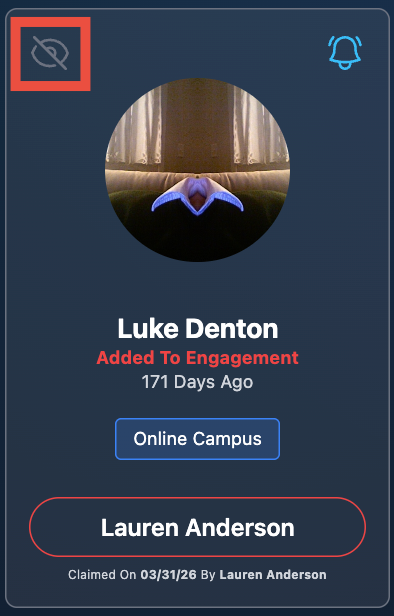
👉 The card will now be hidden from active engagement views. Click show hidden at the bottom of the page to view all hidden cards.
Why Providing a Reason Matters
Adding a reason helps your team:
- Understand why the person was removed from workflows
- Maintain clarity across staff and leaders
- Avoid confusion or duplicate follow-up
Best Practices
- Only hide cards when follow-up is no longer needed
- Always include a clear and helpful reason
- Periodically review hidden profiles for accuracy
Why This Matters
If engagement levels could be manually changed:
- Data would become inconsistent
- Insights would become unreliable
- Follow-up decisions would lose accuracy
By keeping engagement automated and behavior-based, Nurture ensures your team is always responding to what’s actually happening.
Final Thought
You don’t change engagement levels, you respond to them.
And when someone’s journey no longer applies, hiding their card helps your team stay focused on the people who need care right now.